
When you are running a PrestaShop store for a long time, you know that attackers don’t need a clever exploit; they need one gap you forgot to close. A weak admin password, a form with no bot check, a theme file nobody’s watching, any one of those is enough.
A PrestaShop Security Module exists precisely to close that list of gaps in one pass instead of patching them individually. Before picking one, though, it helps to know exactly what “secure” is supposed to mean for an eCommerce site in the first place. A security module for your PrestaShop store only earns its place if it actually covers the seven measures below.
Why These Measures Can’t Wait Until After a Breach
Global eCommerce fraud losses reached an estimated $48 billion in 2023, and payment pages remain the single most attractive target on any store. Attackers don’t discriminate between a large retailer and a small PrestaShop shop; automated scripts scan for the same known weaknesses across thousands of sites at once.
That’s the uncomfortable part. Most breaches aren’t the result of a targeted attack; they’re the result of a bot finding an open door nobody bothered to lock.
The 7 Security Measures Every Ecommerce Store Needs
Each of these addresses a specific, documented attack path rather than a vague “best practice”:
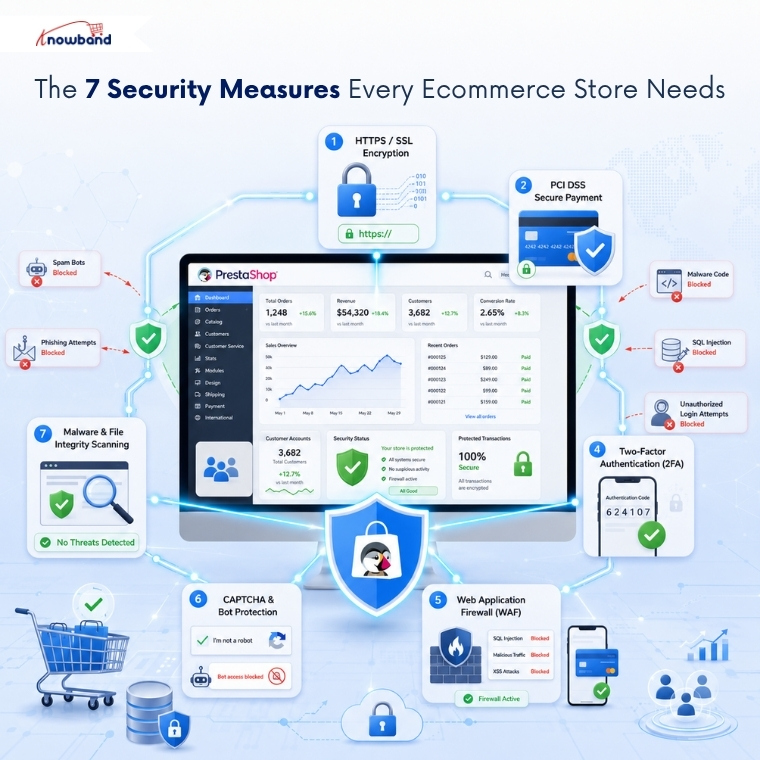
- HTTPS with a valid SSL certificate: encrypts checkout and login data in transit so it can’t be intercepted between the browser and the server.
- A PCI DSS-compliant payment gateway: keeps raw card data off your own servers through tokenization, reducing both risk and compliance scope.
- A PrestaShop Brute Force Protection Addon: automatically locks out an IP address after repeated failed admin login attempts, stopping credential-stuffing scripts.
- Two-factor authentication on admin accounts: makes a stolen or guessed password useless on its own.
- A web application firewall: blocks known SQL injection, cross-site scripting, and path-traversal patterns before they reach your store’s code.
- CAPTCHA and bot protection on public forms: cuts down fake registrations and spam submissions on contact and signup forms.
- Scheduled malware and file-integrity scanning: flags unauthorized changes to theme or core files, the same entry point used in most skimmer infections.
What a PrestaShop Security Module Actually Covers
A PrestaShop Security Module is admin-side and storefront protection bundled into one configuration screen: login hardening, a web application firewall, spam and bot filtering, and file-integrity scanning, replacing the five separate single-purpose plugins most stores install piecemeal. The distinction matters because piecemeal setups are exactly where merchants lose track of what’s actually turned on.
Native PrestaShop covers some of this checklist out of the box. It doesn’t cover all of it, and that gap is where most stores stay exposed longest.
| Security Measure | Native PrestaShop | Needs a Dedicated Module |
|---|---|---|
| HTTPS / SSL | Built-in toggle | No |
| PCI-compliant payment gateway | Depends on the provider | Provider-side |
| Brute-force lockout | Not included | Yes |
| Two-factor authentication | Not included | Yes |
| Web application firewall | Not included | Yes |
| CAPTCHA/bot protection | Not included | Yes |
| File-integrity / malware scan | Not included | Yes |
The PrestaShop Advanced Security Module That Covers This Checklist in One Install
Knowband built the PrestaShop Advanced Security Manager to close exactly the gap the table above shows: five of the seven measures that PrestaShop doesn’t handle natively, configured from a single admin screen instead of five separate plugin dashboards.
It pairs a PrestaShop Brute Force Protection Addon with two-factor authentication on the login form, adds a web application firewall against injection attempts, layers CAPTCHA and honeypot fields across public forms, and runs scheduled anti-malware scans that compare theme files against a known-good baseline. Nothing here is invented for the sake of the list; these are the module’s actual configuration tabs, and Knowband’s documentation maps each one directly back to one of the seven measures above.
Implementing These Measures Without Breaking Checkout
Turn on HTTPS and your payment gateway’s PCI settings first; these have no downside and no configuration risk. Layer in brute-force lockouts next, starting with a moderate retry threshold of around five attempts, then review the login log after a week before tightening it further.
Save the module’s recovery URL before switching on two-factor authentication or IP restrictions sitewide; every serious admin login security tool keeps one for exactly this reason. CAPTCHA and file-integrity scanning are the safest to enable last, since neither one touches the customer-facing checkout flow at all.
A PrestaShop Security Module Is the Checklist That Holds
None of these seven measures replaces the others; HTTPS doesn’t stop brute-force attempts, and 2FA doesn’t catch an injected skimmer script. A PrestaShop Security Module works because it runs them together instead of leaving each one dependent on a merchant remembering to install the next plugin.
If admin login attacks and unmonitored theme files are the two gaps you’re least confident about, a PrestaShop Advanced Security Module closes both alongside the rest of this checklist in one configuration pass. Knowband’s approach to this is the same one recommended above: cover the whole list at once, not one plugin at a time.


