
Why an agency estate is awkward to patch
A single store has one answer to “who patches PHP”. An agency has dozens. One client sits on shared hosting where you have no access. Another runs a VPS you manage. A third deploys Docker images from a pipeline you rarely touch. Some have bundled software that carries its own PHP, which is exactly the case the EU statement flags with a pointer to the NCSC-NL php2shell repository.
That variety is the real risk. Any one site is easy to fix. The danger is the one that falls through a gap in your list because it belongs to nobody in particular.
At Knowband, we understand the challenges agencies face when managing security across multiple PrestaShop stores and hosting environments. Our team is actively working to support clients in addressing the potential impact of the php2shell vulnerabilities by providing technical guidance, helping review PHP compatibility, and identifying the necessary security measures. We aim to help PrestaShop merchants and agencies make informed decisions to protect their stores while maintaining business continuity.
For more information about the vulnerabilities and recommended actions for PrestaShop merchants, read our guide to critical PHP vulnerabilities (php2shell).
Build the inventory first
The EU guidance starts with identifying PHP-based applications and prioritising internet-facing ones. A shared sheet with one row per site does that job. These are the columns worth having:
| Column | Where the answer comes from | Why you need it |
|---|---|---|
| Hosting type | Your own records | Decides who can patch: you, the client or the host. |
| PHP handler | Host or server config | mod_php setups carry the highest risk, so they go first. |
| PHP version | Back Office, Advanced Parameters, Information | Starting point. Not proof of patch status on its own. |
| Patched and confirmed | Written reply from host or your own change record | The only column that really closes a row. |
| Workers restarted | Host reply or your change log | A patched package that was never loaded protects nothing. |
| Public or internal | Your records | Public storefronts before private tools. |
Who does what
Split the work by who holds access, not by who owns the client relationship.
- Shared hosting sites: open a support ticket per host, not per site. One message listing every affected account saves time and gets you one written answer.
- Servers you manage: update the package, restart workers, and log the time. This is the batch your team can finish today.
- Containerised sites: treat it as a build change. The fix lands in the image, and restarting an old image changes nothing.
- Legacy PHP (8.1 or older): the question to answer is which patched package or backport is available. Do not assume the version string tells you.
Interim settings, if a host is slow
Where you control the configuration and the host cannot move quickly, these narrow the exposure. The PHP team is clear that none of them is a complete defence. Put them in php.ini, the FPM pool or the server config, since ini_set and .user.ini will not work for the upload progress setting, then restart workers.
; php.ini, FPM pool or server config
post_max_size = 8M ; 32M if uploads are needed
upload_max_filesize = <below post_max_size>
session.upload_progress.enabled = 0
; PHP 8.5 only
fatal_error_backtraces = 0
Add request size limits at the web server or proxy as well. A raised or unlimited memory setting through php_admin_value is a job for experienced admins, and only where a container or cgroup limit is enforced. Skip RLIMIT_AS and RLIMIT_DATA. Do not count error hiding as a measure at all.
| The only complete fix is upgrading PHP. |
While you are in there: tidy exposed entry points
This is general hardening, separate from the two CVEs. None of our three sources links these items to php2shell so think of them as practice, not part of the actual fix. Since you’re already working on each client server it’s a chance to check two things in custom code and third-party modules:
- Cron endpoints that run without a security token. A cron URL anyone can call directly should require a secret token, so that only your scheduler can trigger it.
- Directly reachable PHP files that handle `$_FILES`. Upload handlers that can be hit without going through PrestaShop’s front controllers, or without authentication, are an easy target. Remove the ones you don’t use and make the others require a token or a logged-in session and have server-side validation for every file that is uploaded.
The settings mentioned earlier are related to uploads, which makes this a good moment to look at upload paths, in general.
Talking to clients
Clients do not need the CVSS score. They need to know three things: whether their shop was affected, what you did, and what happens next. Something like this works as a base:
Subject: PHP security update for your store
On 21 October, the PHP team fixed two serious flaws in PHP itself.
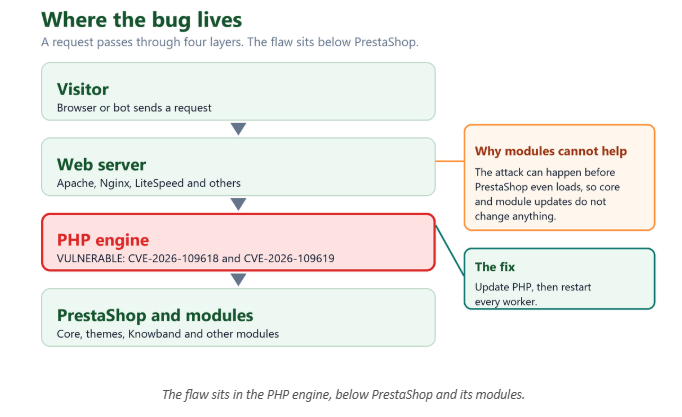
They are not a fault in PrestaShop or in your modules.
We have [updated PHP / asked your host to update PHP] and are
waiting on written confirmation that it is applied and restarted.
We will confirm by [date]. No action is needed from you.
Be careful about one thing: do not frame module or core updates as part of the fix. They are not, and a client who later learns that will wonder what they paid for.
Keep a paper trail
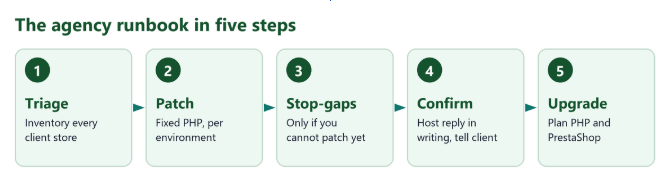
For each site, keep four things: the host’s written reply naming both CVEs, the PHP package or version in use, the time workers were restarted, and the date you told the client. If a question comes up later, that is the whole answer, and it takes thirty seconds to produce.
Scoping the upgrade work separately
Patching only buys time. It does not modernise a site. PHP 8.2 will reach end of life on 31 December 2026. PHP 8.1 and older versions already get no updates. That makes this a good moment to list which clients need to move to a PHP version.
Treat this as a piece of work. Give it its estimate. PrestaShop 9 supports PHP 8.1 to 8.5. For stores running 1.7 or 8.x confirm the supported PHP versions per release before you give a quote.
A major PrestaShop upgrade is not an emergency fix for these CVEs. Mixing it into the incident response is what turns a one-day patch into a month-long project.
For each store plan a staging copy. Check module and theme compatibility before going.
Where Knowband modules fit
For stores you are migrating: Knowband modules are built and tested for PrestaShop 9.2, which runs on the latest PHP versions. Moving your stores to a patched, supported PHP release should therefore not affect module functionality.
If you would like support with a migration, our team can review the current setup and test your modules and theme before go-live. Please note that modules cannot patch PHP itself. The security fix is the PHP update, and our role is to ensure the transition is smooth. Need assistance? Contact us at [email protected].
- PHP official announcement: https://www.php.net/archive/2026.php
- PrestaShop advisory: https://build.prestashop-project.org/news/2026/php-security-updates-october-2026/
- EU joint statement (European Commission DG CNECT, ENISA, CERT-EU, Europol EC3, CSIRTs Network): https://www.enisa.europa.eu/news/joint-statement-on-critical-php-vulnerabilities

