
| You probably can’t fix this yourself. You don’t have to. What you can do is ask the people the right questions and keep their answers. This guide gives you those questions, a way to read the replies and a sense of what can wait. |
Why this alert is not like the others
Security notices for online shops are usually about something you installed: a module with a hole, a theme that needs a patch. You log in press update, done.
On 21 October 2026 the PHP team released fixes for two flaws, CVE-2026-109618 and CVE-2026-109619 that sit in PHP itself. If these flaws are not fixed they could allow code to run on a server without any login. Because PrestaShop sits on top of PHP. The attack can happen before PrestaShop starts, no change you make inside the Back Office can close the gap. The work happens on the server. That usually means someone else has to do the fixing. The CVE-2026-109618 and CVE-2026-109619 fixes are important.
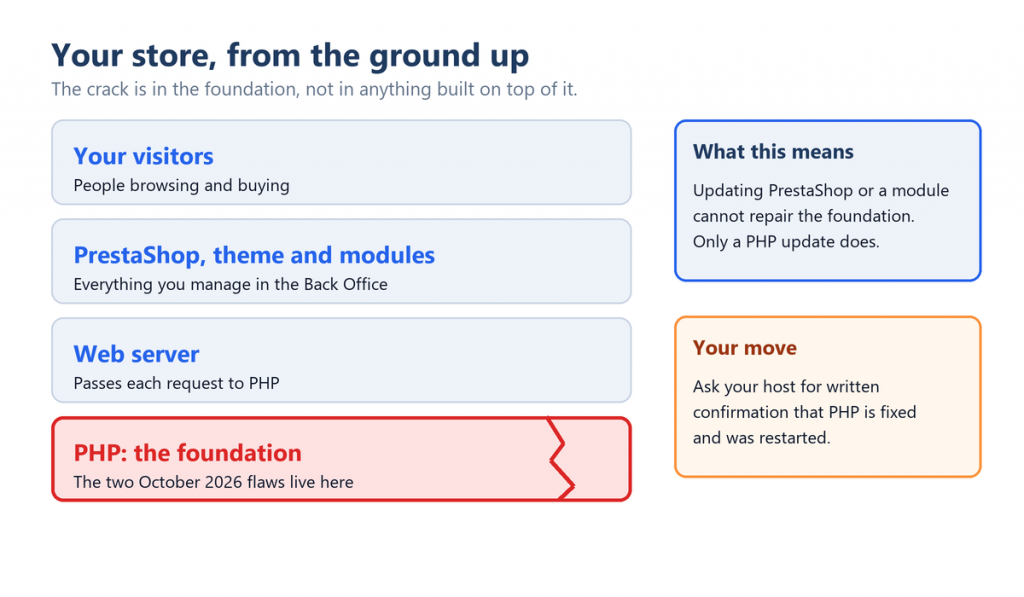
The flaw is in PHP, the foundation, not in PrestaShop or any module.
Seven questions to ask
Send these to your hosting company, or to the developer who looks after your server. Copy the wording if it helps.
- Which PHP version is the store running? You can read it yourself under Advanced Parameters, then Information, in the Back Office. Having the number to hand makes every other answer easier to judge.
- Is that version patched for both CVEs? The fixed releases are 8.5.12, 8.4.27, 8.3.36 and 8.2.35. Older branches may be covered through a vendor-patched package instead. Ask which one applies.
- Were all PHP processes restarted after the update? An installed fix does nothing until the running processes pick it up.
- How is PHP attached to the web server? Setups using Apache mod_php carry the most risk, since the attack can run before any application code. Knowing this tells you how urgent your case is.
- Is there a firewall in front, and does the server accept traffic only from it? A WAF helps, but only for traffic that passes through it.
- If we are on PHP 8.1 or older, what is protecting us? The PHP project published minimal backports for 7.4, 8.0 and 8.1, and many Linux distributions and long-term-support vendors ship patched packages. You want to hear a specific package name.
- When will we move to a PHP version that still gets official updates? PHP 8.2 ends its life on 31 December 2026, so this is worth a date on the calendar.
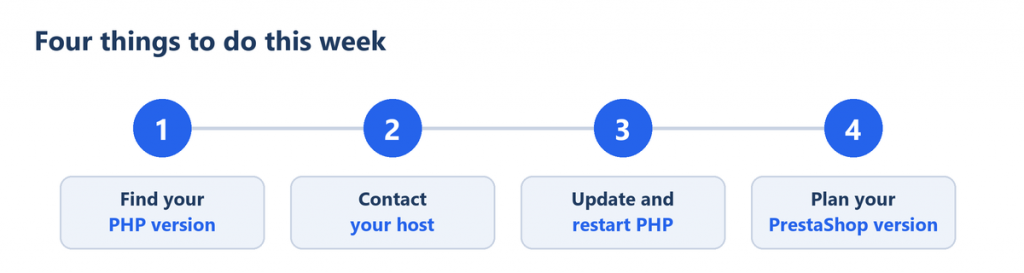
The short version of the seven questions.
How to read the replies
| What you hear | What it tells you | What to do next |
|---|---|---|
| “Both CVEs fixed, PHP restarted” with the package or version named | You have your answer. | File the email. Move on to planning. |
| “We are working on it” | Not yet protected. | Ask for a date, and ask whether short-term limits are in place meanwhile. |
| “Our version is not affected” with no reasoning | Unverified. | Ask them to name the package and confirm both CVEs specifically. |
| “We are on 8.1” or older with no backport mentioned | Possibly unprotected. | Ask about a patched package. Start planning a move. |
| No reply at all | Unknown. | Escalate. Consider whether another provider suits you better. |
A word on the version number. Distributions often apply the fix without changing it, so a number that looks old does not prove you are exposed, and one that looks new is no guarantee either. This is why a written statement from the host matters more than anything visible on screen.
If the fix will take a few days
Ask your developer about the interim measures the PHP team and PrestaShop describe. They include lower request size limits and switching off upload progress tracking. They narrow the opening without closing it, and the PHP team is explicit that no workaround is complete. Hiding error messages is not one of them. It makes no difference.
For cases where fixing is impossible for now, the EU guidance mentions temporarily isolating the exposed application from the public network. For a shop that is a hard call, but it is useful to know the option exists.
| The only complete fix is upgrading PHP. |
Three beliefs worth dropping
- “I will update my modules and I am covered.” Module and PrestaShop updates cannot fix a bug in PHP.
- “My firewall handles it.” It is a useful extra layer. It can be bypassed by altered payloads, and it does not replace the update.
- “I must upgrade PrestaShop immediately.” A major upgrade is a separate, longer project and not a quick answer to these CVEs.
Looking beyond this week
Once the urgent part is closed treat this as a prompt to get your PHP house in order. Aim for a supported version, with a PrestaShop release that works on PrestaShop. PrestaShop 9 supports PHP 8.1 to 8.5. Choosing the newer end of that range makes sense where your setup allows. For PrestaShop releases check which PHP versions each PrestaShop supports before you move.
At Knowband, we understand that upgrading an online store involves more than changing a PHP version. You need to ensure that your essential store functionality continues to work smoothly throughout the process.
Our team can help you prepare for the transition by:
- Assessing compatibility: Review your existing store setup and identify potential compatibility concerns involving PHP, PrestaShop, modules, and themes.
- Preparing your modules: Help you check your installed Knowband modules and identify the appropriate versions for your target environment.
- Supporting migration and testing: Assist with upgrade planning and testing on a staging environment before changes are made to your live store.
- Helping minimise disruption: Identify potential issues early so you can plan the migration with greater confidence.
Get in touch with Knowband:
- Email: [email protected]
- WhatsApp: Contact our team for assistance with your PHP security and PrestaShop upgrade requirements.
Where this information comes from
- PHP official announcement: https://www.php.net/archive/2026.php
- PrestaShop advisory: https://build.prestashop-project.org/news/2026/php-security-updates-october-2026/
- EU joint statement (European Commission DG CNECT, ENISA, CERT-EU, Europol EC3, CSIRTs Network): https://www.enisa.europa.eu/news/joint-statement-on-critical-php-vulnerabilities
- Knowband Security Advisory:https://www.knowband.com/blog/prestashop-blog/critical-php-vulnerabilities-updates-2026/

