
Nearly 70% of online shoppers add products to their cart and leave without buying, and most stores do nothing to get that revenue back thinking that it’s lost. Every abandoned cart represents a customer who was already interested enough to engage, which makes it far easier to win back than a cold visitor. So why are so many PrestaShop stores doing nothing after a cart goes cold? The prestashop abandoned cart module by Knowband automates the entire follow-up process, sending targeted emails at the right time to bring those customers back and close the sale.
What Is the PrestaShop Abandoned Cart Module?
The prestashop abandoned cart module is one of the best prestashop abandoned cart reminders that tracks carts left without purchase and automatically sends follow-up emails to those customers on a schedule the admin controls. Admins can configure as many reminders as needed, with or without discount codes attached, and the module takes care of sending them without anyone having to step in manually. Both guest and registered customers are tracked, so no abandoned cart slips through.
Why Abandoned Cart Email Follow-Ups Drive Revenue Recovery
A customer who abandons a cart was close to buying, they just did not finish. That makes them worth following up with, and the window to do it effectively is short. The longer a store waits to send a reminder, the less likely that customer is to come back.
Most stores cannot manage that kind of follow-up by hand. There are too many carts going cold every day, and by the time anyone gets around to sending an email, the moment has passed.
The PrestaShop abandoned cart reminder handles this automatically. The admin sets the delay, configures the email sequence, and the module does the rest, tracking each cart, triggering the right email at the right time, and continuing the sequence until the customer either places an order or the reminders run their course.
PrestaShop Abandoned Cart Module vs Default PrestaShop Follow-Up Methods
PrestaShop does not include built-in abandoned cart recovery. Stores without a dedicated module either follow up manually or do nothing at all. Here is how those two approaches compare to using the prestashop abandoned cart module:
| Factor | Manual or No Follow-Up | PrestaShop Abandoned Cart Module |
| Response Timing | Delayed or inconsistent | Triggered automatically based on admin-set delay |
| Automation | None, requires manual action | Fully automated via cron |
| Scalability | Breaks down as cart volume grows | Handles every abandoned cart without extra effort |
| Personalization | Generic or none | Customer name, cart items, tailored offers |
| Revenue Recovery | Minimal | Consistent recovery through serial reminders |
Stores doing manual outreach are missing most of their abandoned carts simply because there is not enough time to follow up on all of them. The prestashop abandoned cart module removes that barrier entirely. For any store where checkout drop-off is a recurring problem, this is the more practical and profitable approach.
Features of the PrestaShop Abandoned Cart Module
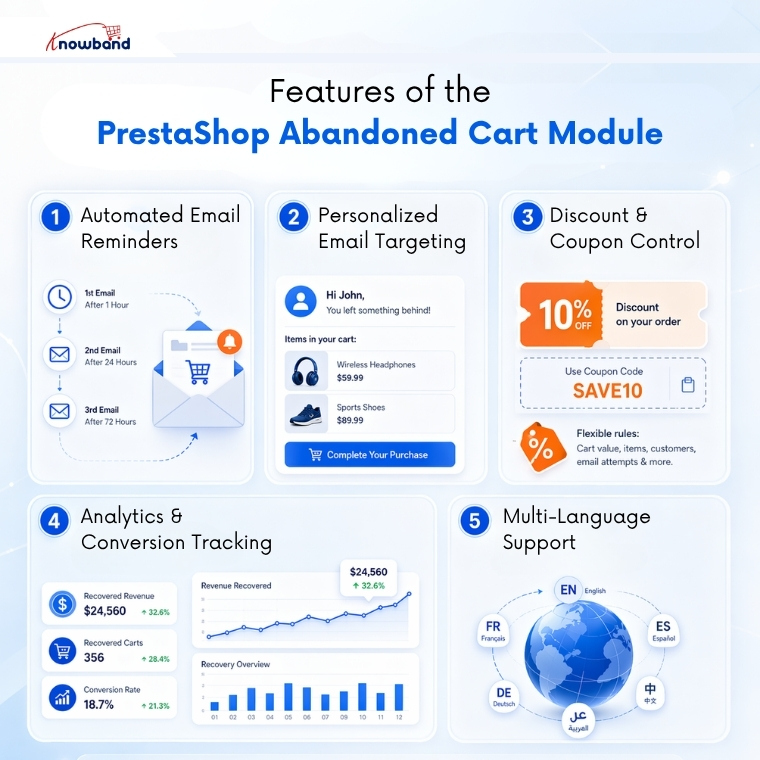
Automated Serial Email Reminders with Admin-Controlled Scheduling
Without a system in place, abandoned carts just pile up with no one following up on them. The module lets admins build a sequence of reminder emails, each one set to go out after a specific number of days from when the cart was marked abandoned. The admin decides how many reminders go out and how far apart they are spaced.
Once the cron is set up, the module runs the whole sequence without anyone needing to check on it. Each reminder can have its own messaging and offer, so the store is not sending the same email twice.
Personalized Email Targeting with Discount and Non-Discount Templates
A follow-up email that feels generic won’t perform as well as one that reflects exactly what the customer left behind. The module pulls the customer’s name and the specific items from their cart into each email, so the message feels like a direct follow-up rather than a mass communication.
The module comes with 20 readymade templates, half with discount codes, half without, and admins can build additional custom templates on top of that. This gives stores the flexibility to test different approaches and see what actually brings customers back.
Discount and Incentive Triggers with Coupon Code Control
Sending a discount in the very first reminder is not always the right call; it trains some customers to abandon carts deliberately just to wait for the offer. The module gives admins control over exactly which reminder in the sequence carries a discount and which ones do not.
Admins can set the discount type, percentage, or fixed value, along with minimum cart amount, coupon validity period, and whether free shipping applies. This means the first reminder can go out as a simple nudge, and the discount only comes in if the customer still has not returned after that.
Performance Tracking and Analytics with Conversion Visibility
Sending follow-up emails without any visibility into what is working is just guesswork. The module has an analytics section that breaks down abandoned carts against converted carts in chart form, showing both the number of carts and the revenue amounts on each side.
The admin can also see which products show up most often in abandoned carts, useful information for identifying where the store might have pricing or checkout issues. A cart only counts as converted when the customer actually places an order after receiving a reminder, so the numbers reflect real recovery rather than inflated metrics.
Multi-Language Email Support for International Stores
Stores that sell across multiple markets need their follow-up emails to go out in the language the customer actually reads. Sending a reminder in the wrong language almost guarantees it gets ignored. The Prestashop Email Follow up addon lets admins translate both email templates and browser notification content into multiple languages directly from the backend.
There is no need for separate tools or manual workarounds for each market the store operates in. Everything is managed from one place, and the right language version goes out based on the customer’s settings.
Conclusion
Abandoned carts are not lost sales, they are pending ones. The prestashop abandoned cart module turns a passive problem into an active recovery process, running automated email sequences in the background while the store team focuses on everything else. Knowband built this module specifically for PrestaShop stores that want to recover revenue without adding manual work to the operation. If your store is watching carts go cold with no follow-up in place, the Prestashop Email Follow up module is the most direct way to change that.
For more such reads, you can visit:
https://www.prestamarketplace.com/
Also on opencart? Click here for more such reads.

